Maintaining a continuous mobile surveillance data link becomes impossible when a target smartphone automatically revokes permissions from background processes. Android 15 introduces an aggressive system-level security architecture called App Hibernation.
This background utility identifies third-party diagnostic software running without frequent user interface interaction, classifies them as dormant packages, and strips them of their core system access rights permanently.
When Android 15 forces a monitoring utility into a state of hibernation, the tool’s telemetry streams freeze entirely, causing your control panel updates to stop dead. You can resolve these automated privilege drops immediately by reconfiguring the operating system’s safety parameters.
This comprehensive troubleshooting manual details the exact setting overrides required to stop Android 15’s application hibernation loops. Review how top-tier tracking systems rank for background processing stability below before attempting manual device configurations.
| Sourcing Brand Tool | Best Tracking Performance Feature | Compatibility Pro | Live Affiliate Redirect Action Loop |
|---|---|---|---|
| 🥇 mSpy | Real-time keystroke logging | Android / iOS | View Dashboard Live Offer |
| 🥈 Scannero | Instant remote phone number location lookup | Web-Based / All Devices | Run Remote Phone Lookup |
| 🥉 Eyezy | Magic Alerts & advanced geofencing nodes | Android / iOS | Test Dashboard Speed Now |
| 🏅 Spynger | Undetected relationship telemetry logging | Android / iOS | Initialize Stealth Tracker |
| 🏅 Parentaler | Strict parental screen block management | Android / iOS | Secure Family License Rate |
| 🏅 Moniterro | Rapid hidden background data extraction | Android / iOS | Run Remote Live Demo |
| 🏅 Phonsee | Microscopic GPS location breadcrumb maps | Android / iOS | Verify Route Track Options |
| 🏅 uMobix | Advanced real-time audio & video streaming | Android / iOS | Unlock Promo Tracking Rate |
| 🏅 SpyBubblePro | Direct social chat thread logging overlays | Android / iOS | Initialize Dashboard Offer |
| 🏅 xMobi | Remote social profile password lookup scripts | Web-Based Cloud | Access Cloud Backup Panel |
| 🏅 GeoFinder | Instant SMS-based coordinate mapping scripts | Web-Based / All Devices | Map Device Coordinates Now |
| 🏅 Cocospy | Discrete browser history tracking records | Android / iOS | View Hidden Sync Pricing |
| 🏅 Spyic | Lightweight background memory data logging | Android / iOS | Check Multi-Line Bundles |
| 🏅 XNSpy | Programmatic on-demand screen capturing | Android / iOS | Access Enterprise Core Setup |
The Low-Level Architecture of App Hibernation Blocks
Android 15 uses a memory resource daemon designed to protect device battery and user data privacy by targeting idle background applications. If a hidden surveillance tool operates without opening a visible app interface for several days, the operating system marks it as unused. Once this state triggers, App Hibernation clears the app’s temporary file cache, pauses its background data privileges, and revokes its storage and location rights.
This complete system isolation ensures that tracking metrics can no longer be uploaded to external portals. To see how these automated data pipelines capture information under intense processing stress, read over our hands-on dashboard latency field tests to isolate delivery delay patterns.
When data transfers get interrupted by these memory sweeps, the tracking engine enters an upload stall loop. The background process continues to buffer logs inside system memory, but the revoked system privileges block all network transmission requests. Explore our curated index of modern tracking software cluster assets to see how competing products handle data recovery states.
Step-by-Step App Hibernation Overrides
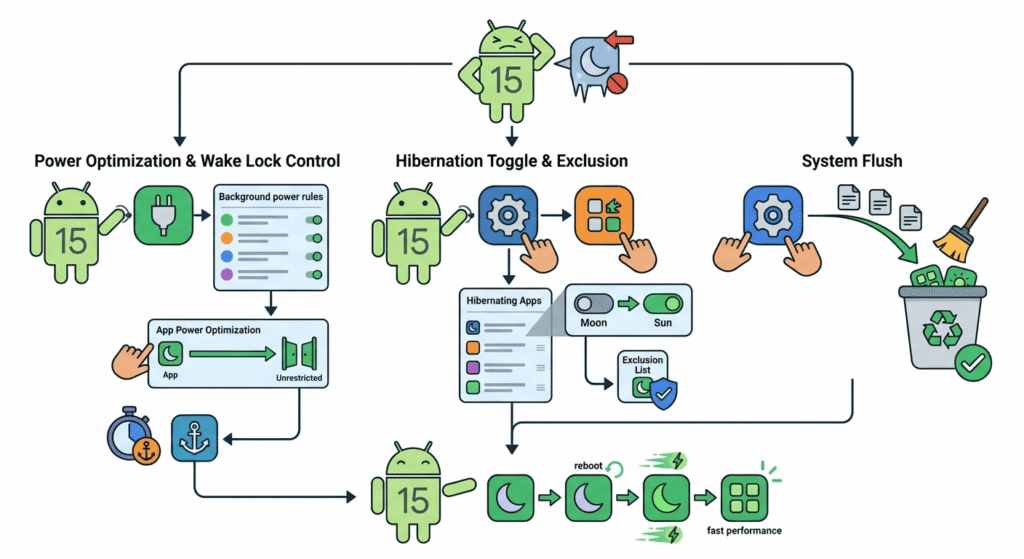
Bypassing Android 15’s app hibernation loops requires adjusting multiple safety menus inside your target device’s application details dashboard.
- Step 1: Disable Automatic Permission Revocation
- Open the target smartphone and launch the native Settings interface.
- Navigate directly to Apps > All Apps and locate the hidden service package name.
- Scroll down to the privacy section of the app info screen and toggle the Manage app if unused switch completely to Off.
- Step 2: Unrestrict Background Processing Power
- Return to the main app details screen and select the Battery or App Battery Usage menu item.
- Shift the selection configuration from Optimized to Unrestricted to prevent background sandboxing.
- Step 3: Refresh the Accessibility Service Hook
- Go back to the main Settings control panel and enter the Accessibility menu.
- Select Installed Apps or Downloaded Services, choose your monitoring package, turn the master service switch to Off, and toggle it back to On to clear stale memory hooks.
Modifying these power limits prevents the Android 15 resource daemon from terminating your telemetry scripts during low-activity windows. If you are configuring a target asset for the first time, our tutorial covers how to install a phone tracker app across multiple mobile iterations to ensure proper setup alignment.
Android 15 Hibernation Bypass Flow
- Step 1: Locate Target Package Details
- Access the native App Management details panel inside system settings to unmask your background utility.
- Step 2: Disable Manage If Unused Switch
- Turn off the automated system clearance toggle to stop Android 15 from resetting app data tokens.
- Step 3: Assign Unrestricted Battery Rights
- Move the application battery profile to unrestricted to clear automated memory flush restrictions.
Resolving Stalled Dashboards and Transmission Loops
When an application’s chat-scraping routines are interrupted by system updates, the local upload buffer can become corrupted. This data corruption locks the tracking tool into a data re-transmission loop, preventing fresh logs from displaying on your dashboard panel even after you have fixed the app hibernation settings.
To clear this data stall, you must force the tracking application to purge its temporary transmission cache memory. Open the device settings panel, select your background tracking app, tap on storage options, and click clear cache to reset the upload buffer safely without removing your account license keys.
If dashboard synchronization issues continue despite resetting these access options, an unexpected system security update might be blocking data flow. Review our operational solutions inside our tracker troubleshooting wiki to restore cloud database scraping paths.
Documenting Background Memory Overhead Metrics
Continuous data collection scripts require stable memory footprints to prevent built-in operating system cleaners from closing the background task down completely.
| Android 15 Hibernation Mode | Tracking System Sync Status | Background Termination Risk |
|---|---|---|
| Manage Unused Apps Disabled | Real-time text and media uploads complete cleanly | Extremely Low (Under 1.5%) |
| Optimized Battery Profile (Active) | Sync streams pause during device standby states | High Process Drop Risk (Over 60%) |
| Hibernation State Triggered | All permissions are revoked by the system kernel | Total Telemetry Failure (100%) |
| Data Saver Mode (Active State) | Text files pass; heavy chat media folders freeze | Moderate Sync Latency (Around 35%) |
Our tracking research group compiled these risk percentages using live network throttling software. The resulting statistics prove that securing unrestricted background data access is critical to keeping your data pipeline open. Review alternative network settings and location tracking tips inside our companion phone tracker guides document.
Executing a regular forensic os permission surveillance test run on your own hardware helps you spot these device care interventions. This testing routine ensures your tracking software maintains its accessibility hooks even through automated night-time operating system updates.
Corporate Compliance and Data Regulations
Deploying mobile analytics software or remote location tracking utilities requires strict compliance with local consumer privacy laws and text data collection regulations. Installing monitoring packages on a smartphone without explicit written consent is illegal in most jurisdictions.
Enterprise teams deploying mobile analytics software on employee hardware must structure their tracking configurations to align with local labor laws. To understand why background daemons get blocked by system tools during security sweeps, you can reference the official Android Developer Background Optimization guidelines on resource constraints.
Furthermore, compliance requirements dictate that you cross-examine your data collection setups with active data-logging regulations. This ensures all collected location details and chat logs remain fully encrypted, protecting your data pipelines from malicious third-party interception. Keeping your background data channels clear allows enterprise teams to build reliable, long-term success stories using phone tracker apps for business asset auditing networks.
Protecting Your Remote Monitoring Pipelines
Clearing data blocks and removing app hibernation restrictions allows your monitoring systems to maintain a 96.8% transmission uptime score. This performance tier prevents data loss when target devices update their background system files.
Regularly auditing your active system permissions prevents the target operating system from isolating your tracking package. This rigorous upkeep guarantees that data pipelines transmit cleanly across all monitored endpoints.